
Unity & C# Fundamentals
I had the unique opportunity to follow a self-paced course developed by
Event Orizon to learn the fundamentals of Unity and C#.
The course was divided into 3 projects described below. For each project, a series of relevant tutorials was presented,
as well as a weekly one-on-one meeting with a mentor professionally trained in Unity and C# for guidance and questions.
I already had some knowledge in both Unity and C# when I followed this course, which allowed me to finish the first 2 projects quickly.
First Project
The first project was using Unity's 2D Game Kit. Its main objective was to get accustomed to Unity's interface and learn its components through customisation and usage of the software. No coding was done for this project, only placing GameObjects and editing properties in the Inspector.

Second Project
The second project was done in Visual Studio with
.NET SDK.
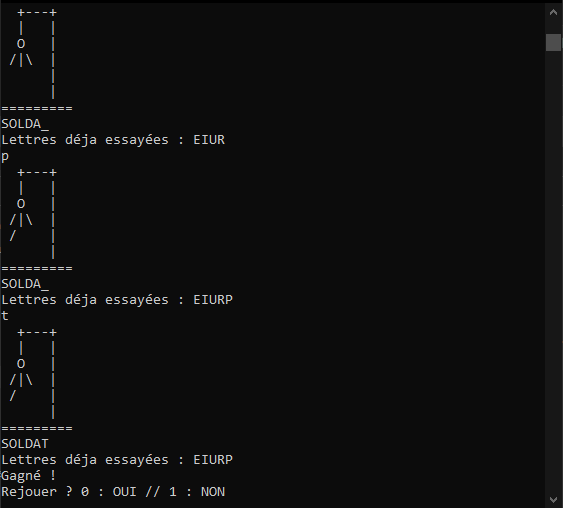
The objective was to code the
Hangman Game
using C# and to learn and practice with Object-Oriented Programming (OOP).
The game tracks letters that the player has already attempted and can be replayed.
I added 2 different game modes : 1) single player where the word to be guessed is a randomly chosen word from a list.
2) multiplayer where Player 1 types in a word for Player 2 to guess.
The hangman figure was drawn using
ASCII art.
Third Project
The third and last project's goal was to put into practice the knowledge acquired in the previous projects,
while still incorporating new skills in both C# and Unity.
The objective was to create a 3D platformer game where the player must pick up as many coins as possible in a limited amount of time.
There were 2 specific game elements to be incorporated as part of the game brief :
3 different coin types, each with a different chance of spawning on generation and each with a different value of points, as well as
a way to teleport the player back to the starting position after falling off the platforms.
Beyond the basic objectives, there were some additional aspects of the game that I incorporated as well to illustrate other coding skills :
An enemy would follow the player, slowing them down when touching.
The player could pick up a pink ball to throw at the enemy to make it go in another direction.
A booster item was added, with a low chance of spawning on each platform. When the player would walk on it,
they would get a movement speed upgrade for a short amount of time.
I also added some post-processing using Unity High Definition Render Pipeline to start learning about post-processing.